
Mastering Google Business Profile for Business Success
In today's digitally-driven world, a strong online presence is essential for any business to thrive. As a savvy entrepreneur, you know that getting noticed by the right audience is the key to success. But, with the countless number of businesses vying for attention, how can you make your venture stand out from the crowd?
Google Business Profile has now entered the chat!
This powerful tool, specifically designed to help businesses like yours, connects you to potential customers in search of your products or services. In this blog post, we will dive deep into the world of Google Business Profile and reveal the secrets to maximizing your exposure, attracting more customers, and ultimately, boosting your bottom line. So, buckle up and get ready to unlock the full potential of this digital game-changer!
What is Google Business Profile?
Google Business Profile (formerly known as Google My Business (GMB)) is a free, user-friendly platform that allows business owners to manage their online presence across Google Search and Google Maps. Think of it as your digital business card, showcasing your company's information such as operating hours, address, contact details, and customer reviews - all in one convenient location.
Google Business Profile helps increase your visibility, making sure customers can easily find you when they search for products or services similar to what you offer. This is very important for local businesses, because you can tap into the potential of nearby customers who are actively searching for what you provide. It can improve your search engine rankings, making it more likely that your business will appear higher in the search results, thereby increasing your chances of attracting new customers.
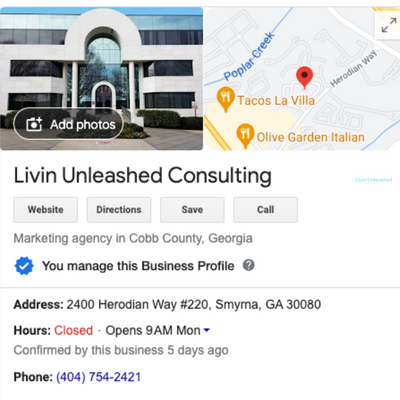
Livin Unleashed Consulting's online presence on Google Business Profile.
Setting Up Your Google Business Profile
Setting up your Google Business Profile profile for success is easier than you might think, and doing so can help you tackle a variety of challenges that businesses commonly face in the digital landscape. To get started, follow these simple steps:
Claim your listing: Begin by searching for your business on Google to see if it already has a profile. If it does, claim it to gain control over the information displayed. If not, create a new listing by signing up on the Google Business Profile website.
Complete your profile: Fill in all the necessary details, including your business name, address, phone number, website, and operating hours. Be accurate and consistent with the information you provide, as this will make it easier for customers to find you and ensure a seamless online experience.
Choose relevant categories: Select the most appropriate categories that describe your business, as this will help Google understand what you offer and match your profile to relevant search queries. This step is crucial in increasing your visibility to potential customers.
Add high-quality photos: A picture is worth a thousand words, so upload high-quality images that showcase your business, products, or services. This will not only make your profile more visually appealing but also help potential customers get a feel for what they can expect when they visit or engage with your business.
Optimizing Your Profile
Optimizing your Google Business Profile profile goes beyond just filling in the basic information. By taking advantage of additional features, you can enhance your online presence and further engage potential customers. Here are some key strategies to elevate your profile:
Encourage customer reviews: Positive reviews can significantly boost your business's credibility and attract more customers. Politely ask your satisfied clients to leave a review on your profile, and don't forget to respond to these reviews promptly and professionally. Engaging with reviewers not only demonstrates your commitment to customer satisfaction but also encourages others to share their experiences.
Utilize posts: Keep your audience informed and engaged by sharing timely updates, promotions, events, or news through Google Business Profile posts. These posts appear directly on your profile, allowing you to showcase your business's personality and connect with customers on a more personal level. Remember to include eye-catching visuals and a clear call-to-action to make your posts more effective.
Enable messaging: Activate the messaging feature on your Google Business Profile to provide customers with a convenient way to ask questions or get more information about your products or services. By being responsive and providing helpful answers, you can build trust and foster strong customer relationships. Just make sure to monitor your messages regularly and respond in a timely manner.
To wrap up, having a well-optimized Google Business Profile is essential for businesses looking to succeed in today's competitive digital landscape. With a well-crafted profile, you'll be able to effectively showcase your business and capture the attention of potential customers searching for products or services like yours. If you're ready to unlock the full potential of your Google Business Profile, our team of experts is here to help!
Take the first step towards maximizing your business exposure by booking our professional Google Business Profile setup and optimization service today. We'll ensure that your profile stands out from the competition, allowing you to focus on what you do best - running your business.
Click the button below to get your Google Business Profile setup and let's start making your business shine on Google!

Boost your businesses online visibility! We setup and optimize your Google Business Profiles for maximum exposure, driving customers & growth. Stand out online today!